Triggerbot
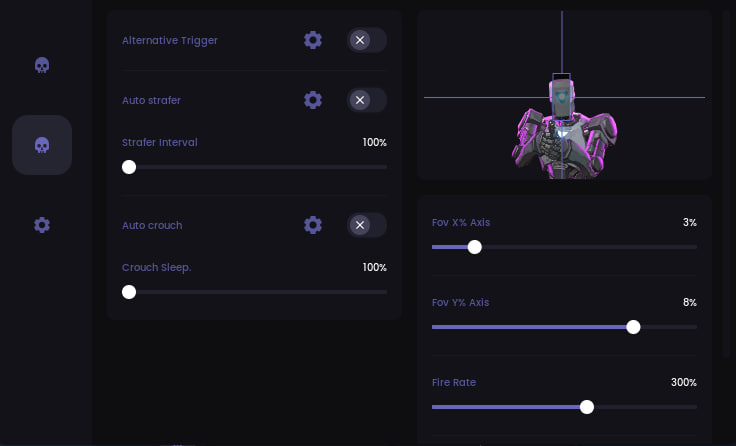
Valorant’s TriggerBot is a Lightning Fast Reaction in Every Battle!
TriggerBot is a smart and unobtrusive assistant for Valorant that automatically fires a shot when aiming at an enemy. No suspicious movements, just a natural and accurate reaction.
Use it sparingly – too frequent use may attract attention.
How to install
STAGE #1 PREPARATION
Step 1: Downloading the Loader and Required Components
Download the loader from: Link
Enter your provided key in the loader window.
Press Enter.
Step 2: Removing Anti-Cheats
Uninstall FaceIt AC, GameGuard, and other anti-cheat/antivirus software (except Vanguard).
STAGE #2 LAUNCHING THE CHEAT AND GAME
Step 1: Entering the Key
Input your key in the loader window and press Enter.
Step 2: Launching the Game
Start the game after the trigger window appears.
-
Use "Fullscreen Windowed" mode instead of "Fullscreen".
Step 3: Trigger Setup
Tutorial video: Link
Step 4: Pixel Change Mode Explained
Pixel change - Trigger activates on any pixel change (not just color), making it significantly faster for pixel-perfect shots.
TROUBLESHOOTING
Loader Closes Without Errors After Key Entry
Clear all files in the Prefetch folder.
Trigger Stops Firing
Change the alternate fire button in both the game and trigger settings.
ERROR: DRIVER FAILED
Caused by active antivirus or anti-cheat software (FaceIt, GameGuard).
Time Synchronization Required
Sync your Windows clock:
-
Press Windows + I
-
Go to Time & Language
-
Click "Sync now" under "Date & time"
What to do if the software does not work?:
To ensure the software works correctly, follow these steps:
1. Using DControl, disable Windows Defender + completely remove all other antiviruses. Necessarily!!!
2. Disable UAC. Necessarily!!!
3. Disable all items in the Exploit Protection tab [DEP, ASLR, CFG, etc.] In rare cases, for some cheats.
4. Disable Smart Screen. Necessarily!!!
5. Disable Firewall. Necessarily!!!
6. Install DirectX and Microsoft Visual C++
Microsoft Visual C++
DirectX
7. Disable kernel isolation. Necessarily!!!
8. Remove Faceit and Valorant [Vanguard] anti-cheat. [Do not remove Vanguard if the cheat is intended for the game Valorant]. Necessarily!!!
9. Faceit - [Open a command prompt as administrator and type [sc stop faceit] ]. Necessarily!!!
Vanguard - [Open a command prompt as administrator and type [sc delete vgc] + [sc delete vgk] ]. Necessarily!!!
11. Restart your computer. If you have uninstalled your antivirus, Vanguard or Faceit. Necessarily!!!

Write a review