Triggerbot Evicted
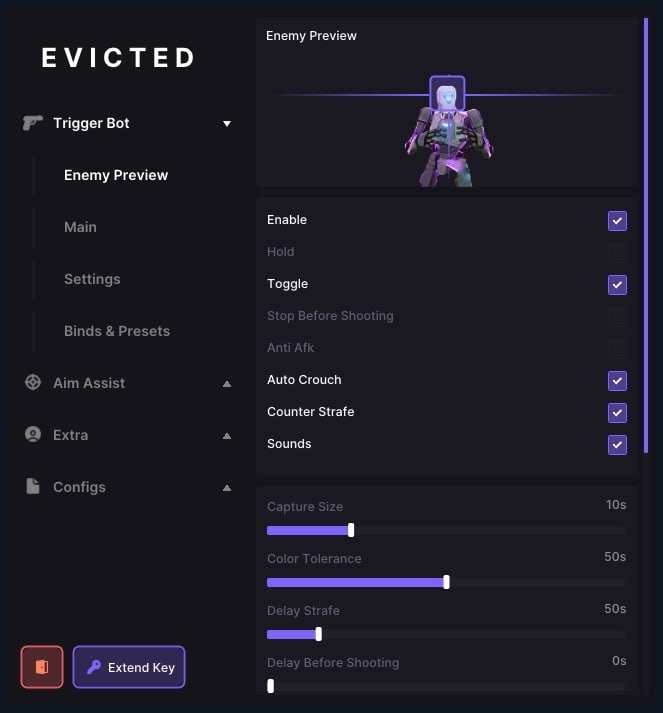
Triggerbot Evicted — Smart ColorBot for Valorant Triggerbot Evisted is an innovative triggerbot based on screen color analysis, which makes it as secretive as possible from anti—cheats. It is not embedded in the game, but simply reacts to pixels, providing a natural game without the risk of being banned.
How to install
Loader - download
Triggering the Trigger:
Open the Loader and wait for it to create a new exe file with a random name.
Run the created exe file with random names as an administrator.
Enter your key and press Enter, the trigger will open.
1. Setting the Fire Key (Shoot Key):
Open Valorant → Settings → Controls → Equipment
Find the Shoot option in the Extra section.
Assign a key, for example, P (This key must match the one that your trigger bot uses to fire)
2. Enabling the trigger bot:
Launch the trigger bot menu
Activate it (by turning on a toggle switch or a check mark)
Set the enemy outline color to purple (Purple Outline) (This color is best recognized by the trigger)
3. Select the activation mode:
Two modes:
Toggle: The bot shoots by itself when turned on
Hold: The bot only fires when you hold down a preset key.
Set the desired activation key in the bot menu.
Use it during the game so that the bot knows when to activate.
4. (Optional) Turn on Aim Assist:
Go to the Aim Assist menu
Turn it on and assign a key to activate it.
Sound signals:
Short sound — Aim Assist is enabled
Long sound — Aim Assist is turned off
What to do if the software does not work?:
To ensure the software works correctly, follow these steps:
1. Using DControl, disable Windows Defender + completely remove all other antiviruses. Necessarily!!!
2. Disable UAC. Necessarily!!!
3. Disable all items in the Exploit Protection tab [DEP, ASLR, CFG, etc.] In rare cases, for some cheats.
4. Disable Smart Screen. Necessarily!!!
5. Disable Firewall. Necessarily!!!
6. Install DirectX and Microsoft Visual C++
Microsoft Visual C++
DirectX
7. Disable kernel isolation. Necessarily!!!
8. Remove Faceit and Valorant [Vanguard] anti-cheat. [Do not remove Vanguard if the cheat is intended for the game Valorant]. Necessarily!!!
9. Faceit - [Open a command prompt as administrator and type [sc stop faceit] ]. Necessarily!!!
Vanguard - [Open a command prompt as administrator and type [sc delete vgc] + [sc delete vgk] ]. Necessarily!!!
11. Restart your computer. If you have uninstalled your antivirus, Vanguard or Faceit. Necessarily!!!

Write a review