MASON
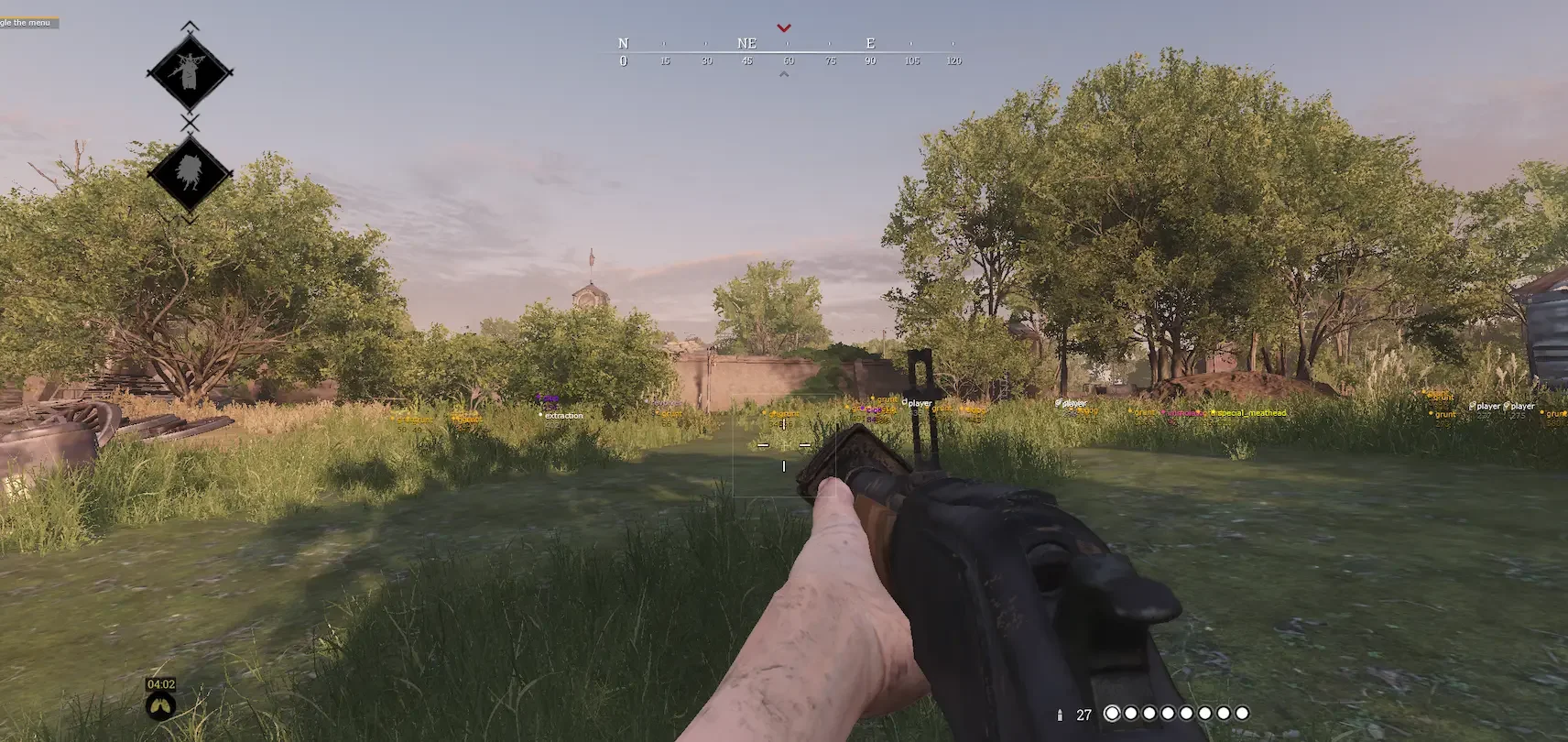
MASON for Hunt: Showdown — your ultimate tactical advantage in the dangerous hunting grounds. This private cheat delivers advanced ESP revealing hunters and monsters through obstacles, smart weapon-adaptive aimbot, and multi-layer EAC protection. Featuring unique masking technology and daily updates, MASON ensures complete account safety and flawless performance across all game versions. With its user-friendly interface, Steam compatibility, and 24/7 support, it’s the perfect solution for players seeking uncompromised dominance in Hunt: Showdown without ban risks.
How to install
Cheat Software Installation & Usage Guide
-
Initial Game Setup
-
Launch your game and navigate to display settings
-
Select "Fullscreen Windowed" mode
-
Close the game completely
-
Loader Installation
-
Download the loader from: link
-
Use your unique activation key received after purchase
-
Right-click the downloaded file → "Run as Administrator"
-
Injection Process
-
In the loader interface:
-
Select your game from the list
-
Click "Run" and wait for completion
-
-
Successful injection shows a verification checkmark
-
System will prompt for mandatory reboot - select "Yes"
-
Post-Installation
-
After reboot:
-
Relaunch loader as Administrator
-
Reselect your game → Click "Run"
-
Immediately launch the game manually after loader closes
-
-
In-game activation: Press "HOME" key at main menu
▬▬▬▬▬▬▬▬▬▬▬▬▬▬▬▬▬▬▬▬▬▬▬▬
Configuration Management
-
Setting Preservation
-
Configure cheat settings in-game
-
Navigate to: CONFIGURATION → "Save config to clipboard"
-
Backup Creation
-
Create new text document (.txt) on desktop
-
Right-click → Paste clipboard contents
-
Save file with encoded configuration data
-
Profile Loading
-
For subsequent sessions:
-
Open your config file
-
Select all (Ctrl+A) → Copy (Ctrl+C)
-
In-game: CONFIGURATION → "Load config from clipboard"
-
▬▬▬▬▬▬▬▬▬▬▬▬▬▬▬▬▬▬▬▬▬▬▬▬
Troubleshooting
For technical issues: the link
What to do if the software does not work?:
To ensure the software works correctly, follow these steps:
1. Using DControl, disable Windows Defender + completely remove all other antiviruses. Necessarily!!!
2. Disable UAC. Necessarily!!!
3. Disable all items in the Exploit Protection tab [DEP, ASLR, CFG, etc.] In rare cases, for some cheats.
4. Disable Smart Screen. Necessarily!!!
5. Disable Firewall. Necessarily!!!
6. Install DirectX and Microsoft Visual C++
Microsoft Visual C++
DirectX
7. Disable kernel isolation. Necessarily!!!
8. Remove Faceit and Valorant [Vanguard] anti-cheat. [Do not remove Vanguard if the cheat is intended for the game Valorant]. Necessarily!!!
9. Faceit - [Open a command prompt as administrator and type [sc stop faceit] ]. Necessarily!!!
Vanguard - [Open a command prompt as administrator and type [sc delete vgc] + [sc delete vgk] ]. Necessarily!!!
11. Restart your computer. If you have uninstalled your antivirus, Vanguard or Faceit. Necessarily!!!
Similar products
Wh-Satano
- 1 д
- 7 д
- 30 д
Write a review