Crusader
What you get
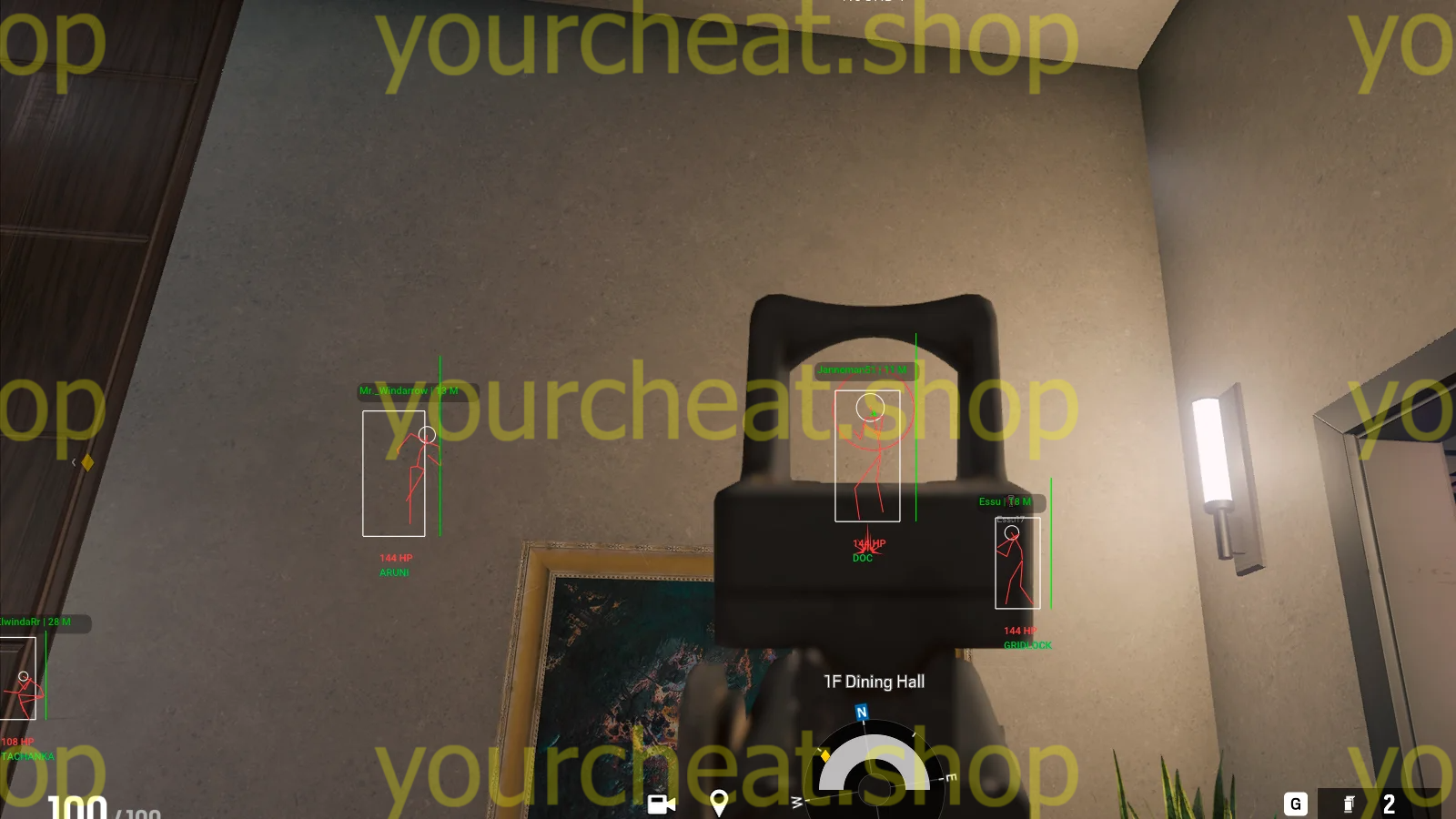
- ESP Box по габаритам модели игрока
- ESP Line с точкой крепления Up, Center или Bottom
- Player Distance с расстоянием в метрах
- Skeleton с прорисовкой конечностей
- Head: отдельная подсветка хитбокса головы
- Name с ником игрока
- Health баром или текстом
- Team Check для скрытия союзников
- Max Distance для ограничения дальности прорисовки
- Аимбот с двумя назначаемыми клавишами активации
- FOV Size и Draw FOV для контроля радиуса захвата
- Hitboxes для выбора кости, Mark Target для отметки цели, Sensitivity для резкости и плавности, статичный Crosshair по центру
We are happy to welcome you to our store page! Get to know Crusader for R6S. This time we offer a really powerful product that will give you unforgettable emotions. We have a great menu, smooth and user-friendly ESP (WH), as well as a powerful aimbot. This is a complete set of tools for R6S! In addition, Crusader is equipped with an effective anti-cheat bypass, which significantly reduces the risk of its detection and allows the software to remain in the “UNDETECTED” status for as long as possible. Crusader really deserves praise, as it turned out to be a high-quality and premium solution. Don’t miss the opportunity to try it out in action — you won’t regret it!
How to install
How to download and run Crusader correctly?
Step-by-step instructions for running the software:
- After payment, you will receive a key to activate access to the software.
- Download the loader using this link. The password for the archive is 123.
- Extract the files from the archive and place them in a separate folder. The folder name should be written in English letters, it is recommended to place this folder in the root of the C drive.
- Run the cheat loader as administrator.
- Insert your key into the "Serial Key" field and click "Sign In".
- After a short loading, you will see the R6S icon.
- Click the "Start Injection Process" button.
- The message "Please Open Rainbow Six Siege" will appear, it's time to launch the game. Be sure to run the DirectX 11 version of the game!
- When the game starts, press the "Insert" key while in the main menu.
- The cheat menu will appear in front of you. The key to close/open the menu is Insert.
If you plan to use Crusader with a spoofer, always run the cheat loader first, and then the spoofer.
Video showing the launch and gameplay.
What to do if the software does not work?:
To ensure the software works correctly, follow these steps:
1. Using DControl, disable Windows Defender + completely remove all other antiviruses. Necessarily!!!
2. Disable UAC. Necessarily!!!
3. Disable all items in the Exploit Protection tab [DEP, ASLR, CFG, etc.] In rare cases, for some cheats.
4. Disable Smart Screen. Necessarily!!!
5. Disable Firewall. Necessarily!!!
6. Install DirectX and Microsoft Visual C++
Microsoft Visual C++
DirectX
7. Disable kernel isolation. Necessarily!!!
8. Remove Faceit and Valorant [Vanguard] anti-cheat. [Do not remove Vanguard if the cheat is intended for the game Valorant]. Necessarily!!!
9. Faceit - [Open a command prompt as administrator and type [sc stop faceit] ]. Necessarily!!!
Vanguard - [Open a command prompt as administrator and type [sc delete vgc] + [sc delete vgk] ]. Necessarily!!!
11. Restart your computer. If you have uninstalled your antivirus, Vanguard or Faceit. Necessarily!!!
Write a review