Arcane
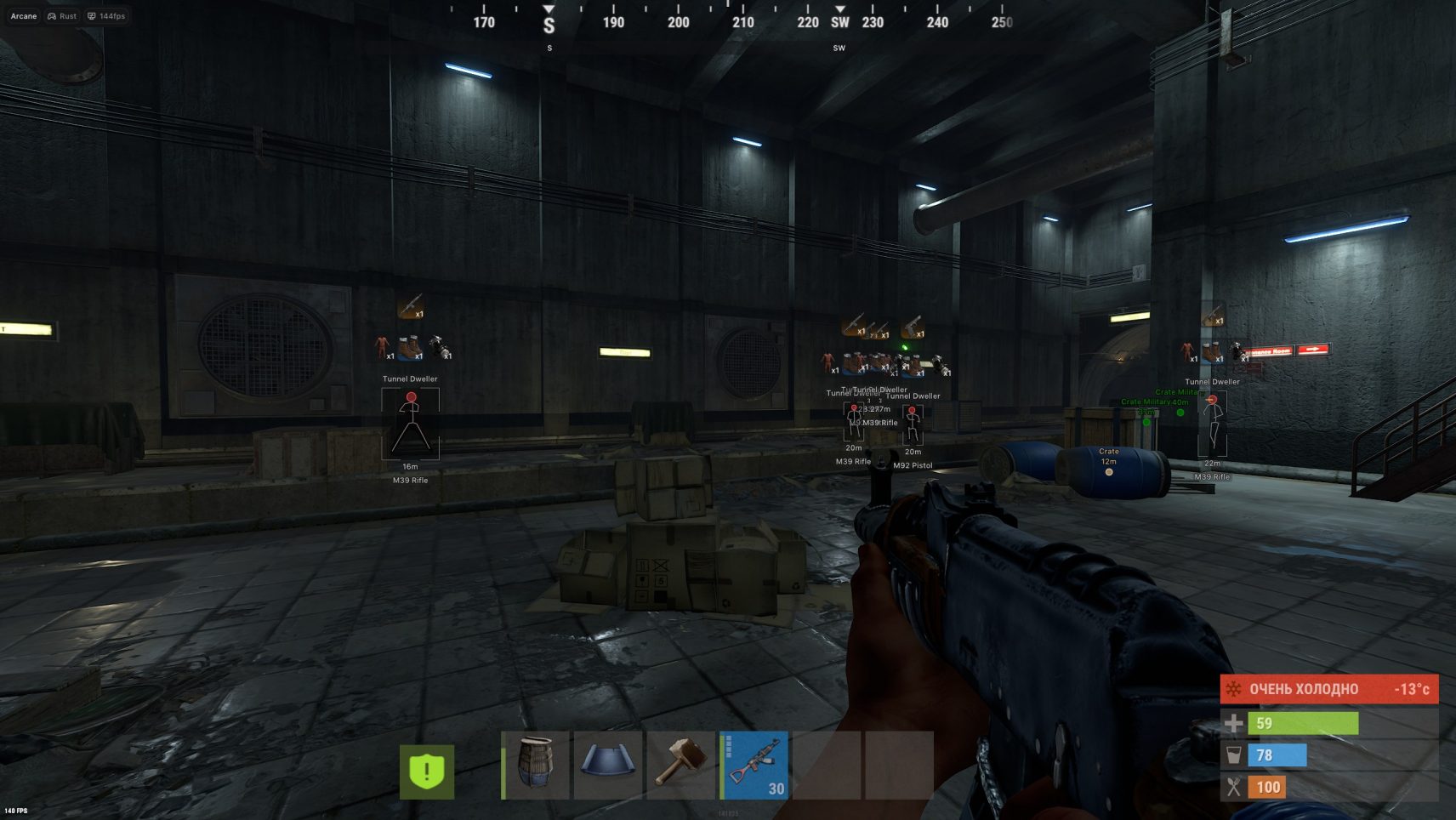
Arcane is an Absolute Advantage in the Brutal World of Rust
In the ruthless world of Rust, where every resource is worth its weight in gold, and danger lurks around every corner, Arcane becomes your reliable ally. This is not just a cheat, it is a high—tech solution for those who seek total dominance.
How to install
Before activating the key:
-
Install this: *link*
-
Read the instructions carefully
-
Restart your computer before launching the software (mandatory)
-
Disable Intel Rapid Storage Technology in BIOS
-
If you experience a blue screen (BSOD) while using the software, please fill out the form
We remind you that using software is always a risk!
-
You purchase the software at your own risk.
-
Undetected status does not guarantee 100% protection against blocking (with any software, a ban is possible in any game).
-
If the update is in the game, wait for the software update.
-
NOT use on the main account.
DISABLE or DELETE MANDATORY
-
Remove antivirus
-
Disable SmartScreen
-
Disable Windows defender
-
Delete FaceIt and Vanguard
FaceIt is a standalone anti-cheat for CS: GO games
Vanguard is an anti-cheat for Valorant
Preparation before key activation:
You have two overlay options to choose from. You don’t need to use both overlays at the same time. Please select only one.
First option — Discord overlay: (Recommended)
-
Download discord from official website: *link*
-
Sign in to your account or create a new one.
-
Please activate “Enable Overlay” and disable “Enable Legacy Overlay”.
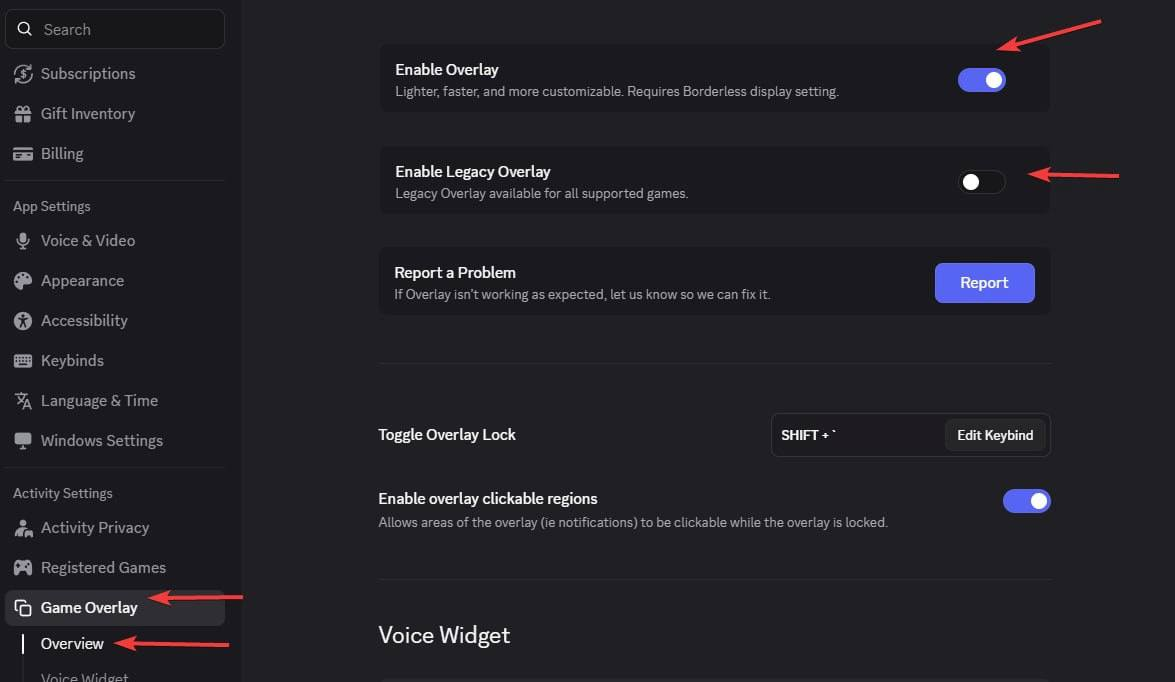
-
Please make sure you haven't disabled the overlay for a specific game.
Second option — Medal TV: (if you can not use discord)
-
Download medal from official website: *link*
-
Start the program and register or login there.
-
Go to the settings and make sure overlay is enabled. (it is enabled by default)
Starting instructions:
-
Download the loader using one of the links. And place it anywhere (it is desirable to create a separate folder for it)
Loader: https://storage.e-arcane.com/LoaderArcane.zip
Mirror 1: https://mega.nz/folder/SFEijIYB#ItpPdnVINK3H-rQXK6DJjw
Mirror 2: https://disk.yandex.ru/d/68JncC0ROmFEzA -
Run the software file as administrator.
-
After the loader update, run it again.
-
Enter your key and press "Enter" (To insert key use right mouse button (RMB) in CMD loader )
-
Loader will automatically close after successful loading
-
Launch the game.
-
Please do not switch to another window until the menu appears.
-
The menu will appear automatically in 1-2 minutes.
You can open / close the menu by pressing the "Home or Insert" key.
To unload the software use the key "END".
Errors:
-
If you see an error “Please make sure PIN is not set in Windows sign-in options and manually disable Hyper-V”
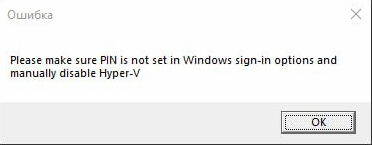
-
You need to completely disable the password on Windows login. You can use this guide: How to remove the login password from Windows 10 and Windows 11 - Lenovo Support SG.
-
Then you need to temporarily disable CPU virtualization in the BIOS.
-
Now run PowerShell as Administrator and enter the commands listed below (you can copy and paste all commands at once; there’s no need to copy them line by line).
|
takeown /F "C:WindowsSystem32hvix64.exe" icacls "C:WindowsSystem32hvix64.exe" /grant *$(([System.Security.Principal.WindowsIdentity]::GetCurrent()).User.Value):F takeown /F "C:WindowsSystem32hvax64.exe" icacls "C:WindowsSystem32hvax64.exe" /grant *$(([System.Security.Principal.WindowsIdentity]::GetCurrent()).User.Value):F del "C:WindowsSystem32hvix64.exe" del "C:WindowsSystem32hvax64.exe" |
-
Error “Failed to map memory”
- If you have less than 12 GB of RAM, contact your retailer for a refund.
- Disable all programs at startup and restart your PC.
If the problem is not resolved:
- Download AutoRuns: *link*
- Disable all programs listed in this path (CurrentVersionRun)
-
Loader close with no error:
- Install this: *link* -
you can see menu in the game, but you cannot interact with it
- Run the overlay as administrator according to the instructions above. -
Windows 10 "Make sure all antiviruses are disabled" error:
- Uninstall all third-party antiviruses
- Disable real-time protection
- Disable SmartScreen -
Windows 11 "Make sure all antiviruses are disabled" error:
- Download both files: *link*
- Run Turn_ON, agree to the changes in the registry, restart the PC.
- Then run Turn_OFF, agree to the changes in the registry, restart your computer.
- If this doesn't help, check that you have removed antivirus and disabled real-time protection. -
Other errors caused by loader:
- Send a screenshot of the error to support on the website (bottom right corner), download Anydesk and also send it to support chat. -
You can see the menu, but it is not clickable:
- Run Steam NOT as administrator
- Disable all third party overlays -
Menus disappear in game or there are menus but visual functions don't work:
- If there was a patch in the game, wait for a product update
- Check the integrity of the game files, but a full reinstall is best
- If none of the solutions worked for you, contact the support chat room -
The menu in the game is not clickable / does not open the first time:
- Start Steam WITHOUT admin rights (in case you play via Steam).
- Disable EA App overlay in the application settings (in case you play via EA App). -
AES instruction set is not supported:
- This error means the processor does not support AES instruction set, so it cannot be fixed. Contact for refund. -
Please enable Intel VT-X in the BIOS:
- To fix this error, enter the BIOS and search for a feature named either "Intel virtualization technology" or "Intel VT-X" and enable it. -
Please enable AMD-V in BIOS:
- To fix this error, enter the BIOS and search for a feature named either "AMD-V" or "SVM mode" and enable it. -
Please disable secure boot in the BIOS:
- To fix this error, enter the BIOS and disable secure boot feature. -
Unsupported firmware:
To fix this error, convert the disk containing the operating system to GPT format using the built-in Windows tool mbr2gpt or any disk management utility of choice. -
Secure boot keys are incorrect and need to be enrolled:
To fix this error, enter BIOS and enable Secure Boot, save the settings, make sure you have enabled it correctly by opening PowerShell and typing "Confirm-SecureBootUEFI", if the output is "True", you can reboot the computer, then enter BIOS and disable Secure Boot. -
VMX/SVM is not supported:
To fix this error, browse to "Control panel" -> "Programs and Features" -> "Turn Windows features on or off", and make sure that "Virtual machine platform" and "Hyper-V" are disabled. If the error still persists, open cmd as administrator and enter the following command without quotes "bcdedit /set hypervisorlaunchtype off" then press Enter and reboot the pc. -
Incorrect hwid
- Open cmd as administrator, enter these commands one by one
wmic diskdrive get Caption, SerialNumber
wmic baseboard get SerialNumber
if any of those commands failed with an error then something is wrong with your pc, try to reinstall Windows and check if the problem is gone. -
If you encounter any other problems, contact support on the website.
Write a review